iQ GUIDES · HOME SCREEN
How to add a quit-smoking widget to your iPhone
Keep your smoke-free time and estimated savings close by. Add the iQ Flip Clock to your Home Screen, then choose the size that fits your day.
Add your iQ widget
You’ll need iQ on your iPhone. Open the app and complete setup, including your quit date. Enter your smoking habits and pack cost if you want an estimate of money saved.
Go to your Home Screen
Choose the page where you want your progress to appear. Touch and hold an empty area until the app icons start moving.
Open the widget gallery
Tap Edit in the upper-left corner, then choose Add Widget. The buttons may look different on another iOS version.
Find iQ
Enter iQ in Search Widgets. In the English interface shown here, tap iQ: Quit Smoking in the results. The widget’s name is iQ Flip Clock.
Choose small or medium
Swipe across the preview to choose a size. The small widget is a compact square; the medium widget gives your clock and savings more room. Tap Add Widget.
Place it and finish
Drag the widget to the spot you want, then tap Done in the upper-right corner. On the version shown here, Done appears as a checkmark.
What to look for
These are captures of the actual iPhone widget gallery. Open any screenshot for a closer look.
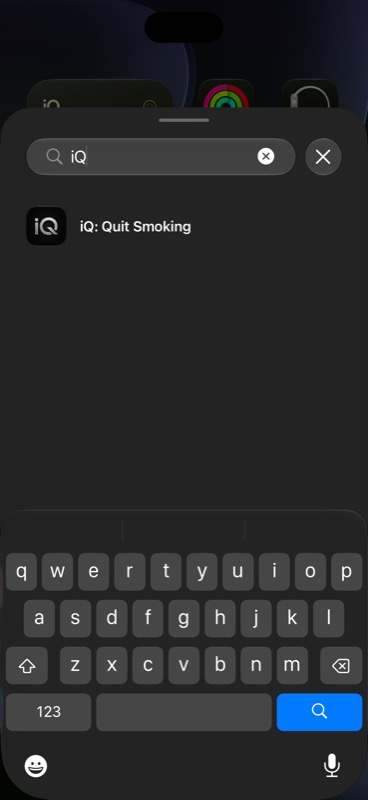
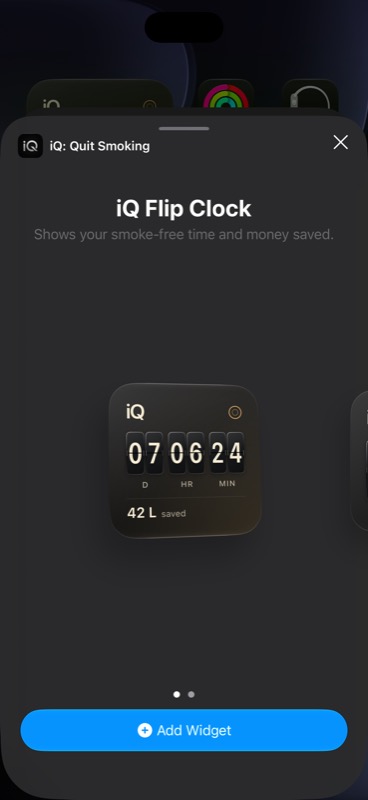
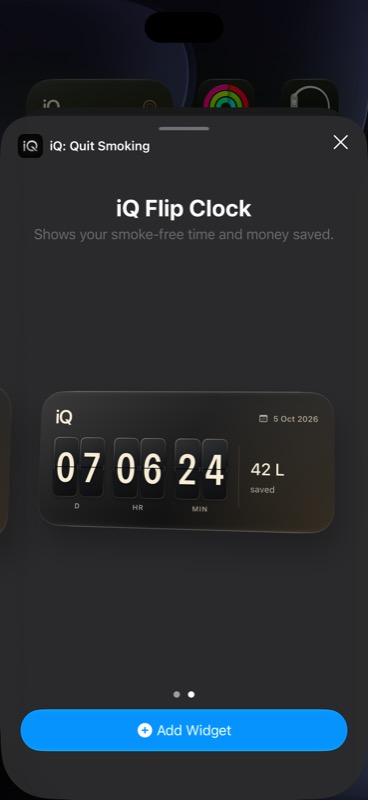
Gallery previews use example progress, not your own quit date or savings. Screens were captured in the iPhone simulator on iOS 27. Appearance and currency can vary with your settings.
Which size should you choose?
Small: a quick glance
Choose small if you want your smoke-free clock alongside your app icons. Your estimated savings sit underneath the clock.
Medium: more room for your progress
Choose medium if you prefer a wider view, with your clock and estimated savings side by side. You can add both sizes or return to the gallery to pick another.
The clock adapts as your attempt gets longer: days, hours and minutes at first; months, days and hours after a month; then years, months and days. Widgets refresh periodically, so they don’t behave like the app’s continuously animated clock.
If something doesn’t look right
I can’t find iQ in the widget gallery
Check that iQ is installed on this iPhone and open the app once. Return to the Home Screen, reopen Add Widget, and search for iQ. You can also browse the app list. If it still doesn’t appear, check for an iQ update and restart your iPhone. If the problem continues, contact support with your iOS and app versions.
The widget says “Set your quit date”
Open iQ and finish setting up your quit date. The widget needs that date to calculate your progress. Return to the Home Screen and allow time for it to refresh. If the app already shows your correct quit date but the widget still asks for one, try removing and adding the widget again, then contact support if it persists.
The time hasn’t changed yet
iOS controls when widgets refresh. The widget shows a periodic view of your progress and does not update every second. Open iQ to check your current progress. A short delay in the widget does not mean your quit date has been lost.
My savings look different from the preview
The gallery shows sample values. Your widget estimates savings using your quit date, cigarettes per day, cigarettes per pack and pack cost from iQ. Check those entries in the app. The number is an estimate of cigarette spending avoided, not a measurement of your bank balance.
Can I put this widget on the Lock Screen?
iQ currently offers small and medium Home Screen widgets. These are not Lock Screen widgets. The Apple Watch companion is separate; see the widget and Watch overview.
How do I move or remove it?
Touch and hold the widget, choose Edit Home Screen, and drag it to a new position. Tap Done when you finish. To remove it, touch and hold the widget and choose Remove Widget, then confirm. Removing a Home Screen widget does not delete the iQ app or its saved quit progress.
Explore a little more
See iQ widgets and Apple Watch · Try the free smoking-cost calculator · Get help with iQ
The setup flow was checked in iOS 27 and against Apple’s guide to adding and editing widgets. Widget features and screenshots come from iQ.